Serving HTML pages
Now that we know how to return JSON, we’ll see how to return HTML
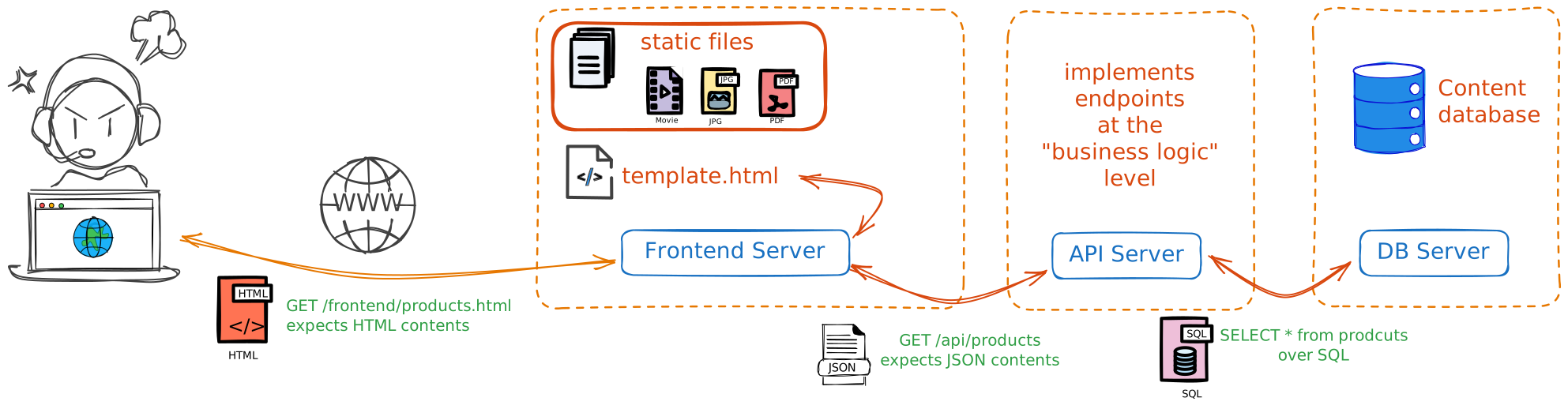
one possible architecture for a web application (using Server Side Rendering)
We’ll focus on Jinja2 templates here, which is the most common solution in the Python world. The general principles apply to other template engines as well.
Static files vs templates
Focusing on the middle box in the above diagram, 2 types of files can be served:
Static responses
content depending on nothing
just files served as-is
e.g. images, fonts, css, js, etc.
Dynamic responses
content depending on external data e.g. product search, user profile
obviously the most common case
static files in production
It’s really not useful to solicit a Python stack just to serve a CSS file!
So for performance reasons, it’s better to serve static files via a dedicated web server
typically nginx, caddie, ...
That’s why it’s good practice to cleanly separate them from the rest
Repo structure
Before we dig in, this is not imposed by the framework, but we usually find a repo structure like this:
./
├── main.py                   # FastAPI app
├── templates/                # Jinja2 templates
│   ├── base.html
│   └── users/
│       └── profile.html
├── static/                   # CSS-JS-fonts-images
└── config.py                 # settings
Program 1:Usual repo layout for a FastAPI app
Template engines
A template engine let us combine:
an HTML skeleton
variables injected from Python
inside the skeleton
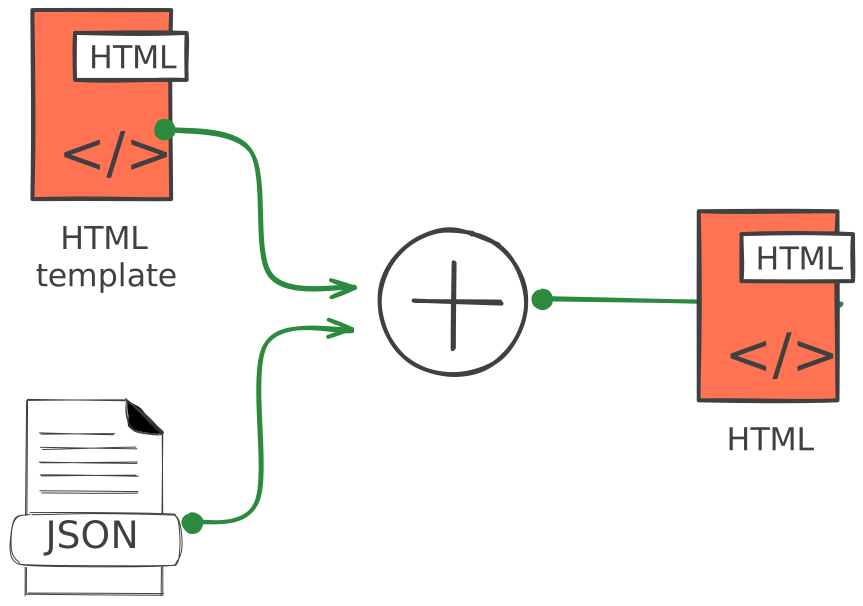
Several technologies/solutions:
Jinja2, Pug, Mustache, Ejs
We’ll briefly describe how to leverage Jinja2 from a FastAPI app,
and see also a bit more advanced features, like loops, conditions, etc...
Example: the Jinja2 template
For starters, With this input file templates/hello.html:
1 2 3 4 5 6<!DOCTYPE html> <html> <body> <h1>Good morning {{ name }}!</h1> </body> </html>
the part {{ name }} is a variable placeholder
it means jinja will replace it with the value of the variable name provided by Python
now, let’s see how to do that in practical terms
Example: the Python code
Here’s the corresponding code on the Python side:
1 2 3 4 5 6 7 8 9 10 11 12 13from fastapi import FastAPI, Request from fastapi.templating import Jinja2Templates from fastapi.responses import HTMLResponse app = FastAPI() templates = Jinja2Templates(directory="templates") @app.get("/hello/{name}", response_class=HTMLResponse) def hello(request: Request, name: str): return templates.TemplateResponse( "hello.html", {"request": request, "name": name} )
➡️ When a user visits e.g. /hello/Alice, they see Good morning Alice! rendered as HTML
the request parameter
request parameterNote that we pass the request parameter to the template engine,
this is because Jinja2 may need it for certain operations (e.g., URL generation,
session handling, etc...), even if we don’t use it directly in our template here.
how would you install it ?
yes, of course:
pip install jinja2Jinja2 features
Variable substitution
To display the content of a variable in HTML, you need to surround it with double braces in HTML code.
<div>Hello {{ name }}</div>Jinja will evaluate the expression inside {{ ... }} and replace it with the corresponding value; so if name = "Alice" in Python, the rendered HTML will be
<div>Hello Alice</div>Conditional blocks
To choose whether to display a part of the HTML page
you can use branches of type {% if %} {% else %} {% endif %}
The syntax is as follows
1 2 3 4 5 6 7{% if a_condition %} <div>some html mess</div> {% elif another_condition %} <div>another html jumble</div> {% else %} <div>the default html</div> {% endif %}
Note Python’s None becomes none in Jinja2
For loops
The main interest being dynamic table display.{% for %} loops in Jinja2 allow you to iterate over any iterable Python object
The syntax is as follows
1 2 3{% for x in my_list %} <div>Iteration {{ x }}</div> {% endfor %}
→ Dictionary access
if x is itself a dictionary, we can access its keys/values via e.g. x.name or x['name'], the first being generally more convenient
1 2 3 4 5 6 7{% for user in users %} <div>Iteration {{ x.name }} or also {x['age']} </div> {% endfor %}
Plenty of other cool stuff
We’ve skimmed over Jinja’s basic features but there are lots of advanced super practical things
Please refer to the official documentation for more details
Non-exhaustive list:
Template composition by inheritance
to nest templates within each other
Filters
to format data
Macro definition
a bit like functions in Python
Difference API / Templates
JSON API: returns raw data, consumed by a front app (React, Vue, etc.)
HTML Templates: directly return pages ready to display in the browser
👉 FastAPI can do both depending on needs:
by default, FastAPI returns JSON responses, as we’ve seen plenty of times now
in the example above, we explicitly specified
response_class=HTMLResponseto return HTML
One of the reasons why it’s helpful to expose the API separately is that the data becomes available to other clients - mobile apps, third-party services, etc... - that would otherwise need to reverse-engineer the HTML pages to extract the data !
Optional part
The rest of this notebook is optional
It deals with more general information about current trends in web development
It’s clearly not crucial for beginners, feel free to skip it !
Dynamic page: CSR vs SSR
Now, more generally for dynamic pages, two approaches exist
Client Side Rendering
vs
Server Side Rendering
What we’ve just seen - using templates - belongs in the SSR category
SSR (Server-Side Rendering)
The server produces complete HTML for each request (e.g., templating).
Pros:
SEO (search engines see the content directly).
Very fast first page load.
Cons:
each interaction often requires reloading a page.
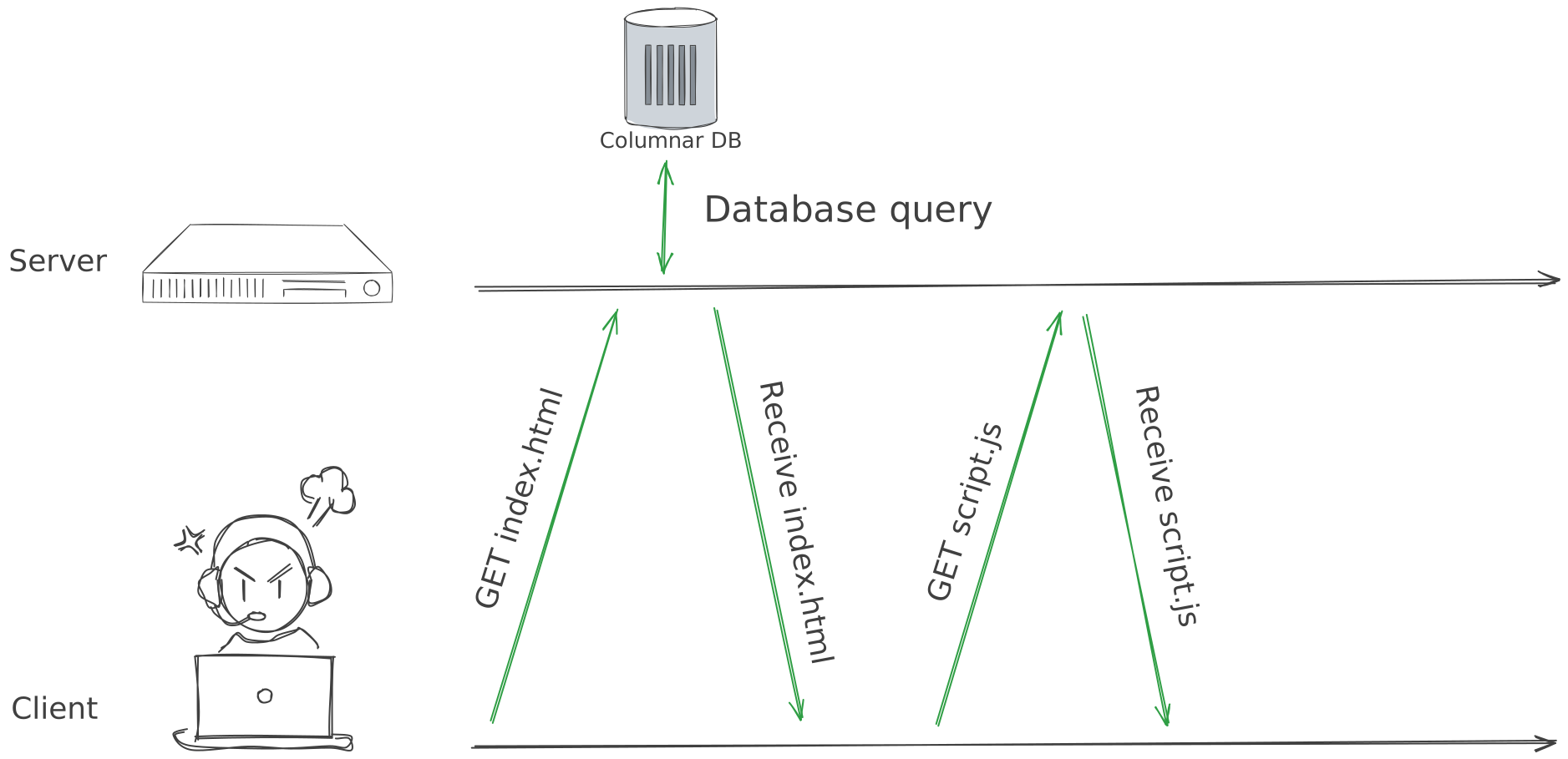
CSR (Client-Side Rendering)
The server sends an “empty” page with JavaScript (e.g., React, Vue, Angular).
The browser executes the JS that builds the page by calling the JSON API.
Pros:
Smooth user experience
(SPA-type app).Good backend (API) / frontend (JS) separation.
Cons:
Longer initial load time.
More complex SEO.
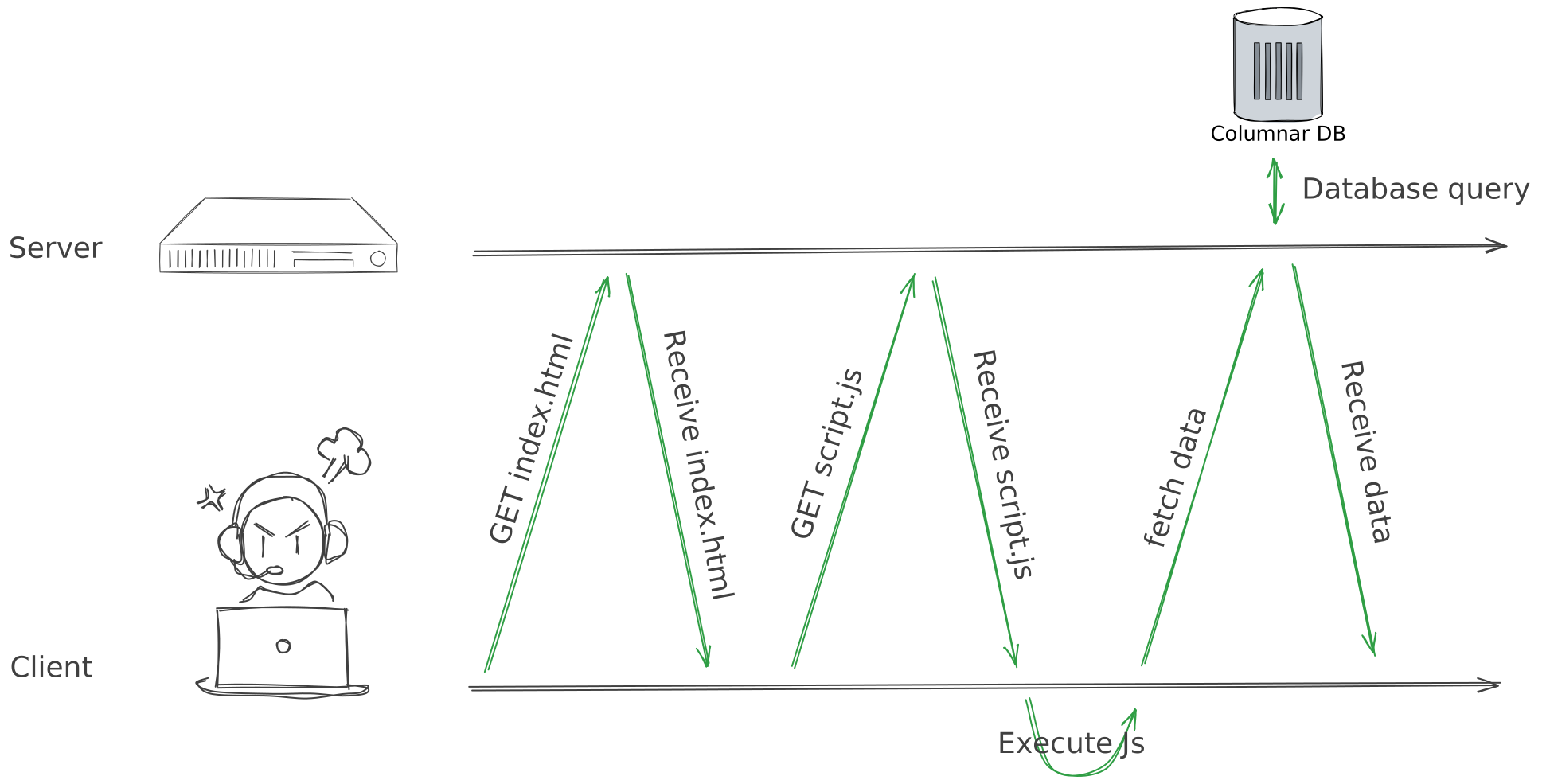
ISR - Hybrid approaches
Bleeding edge technologies (e.g., Next.js, Nuxt) tend to mix both approaches:
first page generated server-side
subsequent interactions client-side
this paradigm is sometimes called ISR (Incremental Static Regeneration)
CSR vs SSR summary
Both modes have advantages and disadvantages, but roughly:
CSR is cool for
Having pages with lots of interaction,
especially when you’re more into web app than website
SSR is good for
speeding up the initial loading of your site, if you have little user interaction,
if you want to optimize your natural search engine ranking.
And from a very pragmatic point of view, this may also depend on your comfort level programming in Python or Javascript 😉
When to use what
Marketing / showcase pages: often SSR or static → fast and good for SEO.
Rich applications (dashboards, SPA): often CSR with a backend API.
Classic applications: simple HTML templates suffice (forms, list display).
Conclusion
FastAPI is not limited to APIs: it can also serve dynamic HTML templates.
The choice between static, dynamic with templates, SSR or CSR depends on the type of application and needs (SEO, interactivity, performance).
👉 In an educational context, starting with Jinja2 templates is ideal for understanding server-side page generation before exploring modern front-end architectures.